

You are halfway through Produce when someone catches you about the wet wall. You agree who will do it and when. Before you get back to your desk, there is a sick call in bakery and a question from the front end.
The request was clear in the conversation. The challenge is keeping it clear after your attention moves.
That is a familiar tension in retail discussions. One assistant store manager describes floor coverage crowding out management work. A front-end manager describes reorganizing the shift around call-outs. A useful capture habit has to fit the time you actually have on the floor.
Say the request the way you would give it
You do not need to dictate a polished task title. Start with the action, the person, the department and the time you agreed.
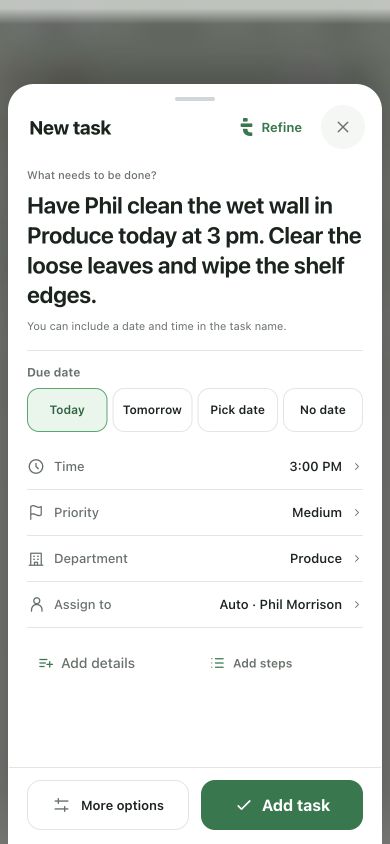
There is enough here to return to the work: Phil, Produce, today, 3 pm, and two concrete steps. It is more useful than a voice memo called “Produce” that you need to listen to again.
Taldi’s task composer can detect people, departments and timing from a natural request. Create by voice can prepare task and routine previews, and optional AI help can turn rough wording into a clearer draft.
Check the fields that change the work
Take a moment to review the result before saving. Check the person, department, date and time. Names can sound similar, and “tomorrow” can be easy to miss when the radio is going.
- Person: is this the Phil you meant? A saved, unambiguous teammate can be matched; if the name is unclear, choose the right person.
- Department: does the work belong in Produce, or is it a request to another team?
- Timing: did you say 3 pm, and is that actually the agreed time?
- Next steps: is the job clear enough to recognize when you come back to it?
Do not add a deadline just to fill a field. If the time is undecided, leave it undecided and settle it with the person doing the work.
Let AI help with the wording
The whole sentence can stay with the task, but a shorter title is easier to scan. “Clean the wet wall” tells you what the task is. “Clear the loose leaves” and “wipe the shelf edges” belong in the details or steps.
Use the AI refinement when it helps. Check that it preserved the actual request and did not turn a suggestion into a commitment. The person who knows the conversation is still you.
The three-step walkthrough shows that progression: your words, the details to check, then a clean task ready for review.
Keep separate promises separate
“Call maintenance, check tomorrow’s eggs and send the labor update” is three pieces of work. They may have different owners and finish at different times.
When you use Create by voice for several requests, review the individual previews. Remove anything you do not need and make sure a one-time check has not become a repeating routine. You can also type when the aisle is too loud or the details are easier to write.
Bring the task back at the right moment
Capture is the start. Look at the work before the next department check-in, ahead of your district call or while preparing a handoff. That is where the saved details become useful.
A task assigned in the morning may still matter to the evening manager. Grocery’s cereal end cap cannot become oatmeal until the sale is over tonight. Choose that unfinished task for your handoff and keep the owner and timing visible.
Start with one kind of request you often lose between interruptions. Give it a place to stay, then see whether you can pick it up without reconstructing the conversation. Taldi’s task capture, routines and handoffs are built around that return to the next step.